





Design to fabrication automation removes the manual re-entry between design and fabrication tools. Every re-keyed part is a chance for the wrong part to reach the machine. A mapped pipeline moves the data once, checks it, and passes it on.
No charge. You get a one-page read on where your project data actually breaks, and one named next step.
At a glance
- What you get
- A mapped pipeline between your design and fabrication tools, validated on your own sample jobs
- Who is responsible
- BluEnt specifies, builds and validates. You provide models, libraries and sample jobs, and approve the mapping
- How it starts
- A Project Data Walkthrough, at no charge
- How it is scoped
- A build with named outputs, agreed before work begins

The problem, specifically
Design data rarely arrives at the machine intact.
A part modeled in Revit or Inventor is redrawn in Cabinet Vision or Microvellum, then checked by hand before a CNC program is written.
Each hop has its own failure. Geometry is rebuilt rather than translated. Material and hardware data is retyped. Part names drift between systems, so cut lists and labels stop matching the model.
Handover data has the same problem at the other end. IFC and COBie exports are set up by hand for each project, then checked against the client’s information requirements one property at a time.

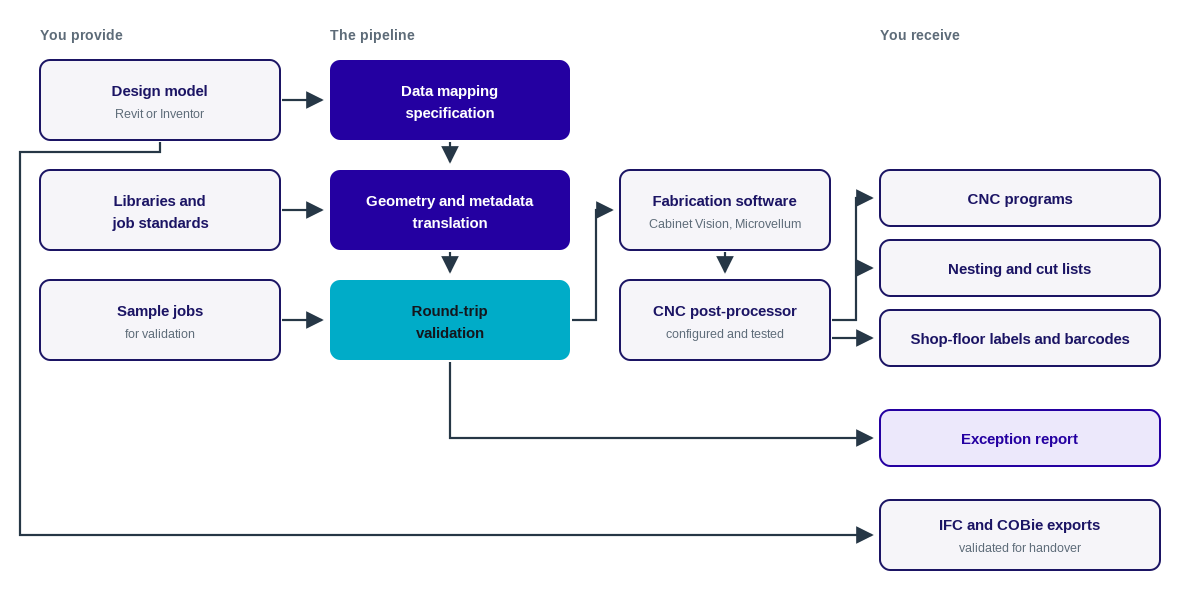
Design to fabrication automation, how it works
One panel’s data, followed from the design model to the CNC machine and the shop label, with nothing redrawn or retyped.
Understand the concept
- The problem. Design data rarely arrives at the machine intact. A part modeled in Revit or Inventor is redrawn in Cabinet Vision or Microvellum, then checked by hand before a CNC program is written.
- Where it breaks. Each hop has its own failure. Geometry is rebuilt rather than translated, material and hardware data is retyped, and part names drift between systems, so cut lists and labels stop matching the model.
- How it is fixed. A part’s size, material, finish and hardware pass from Revit into Microvellum through an agreed data map, so nothing is redrawn. Automatic checks compare what arrived with what was sent, and any part that doesn’t match is flagged on the exception report before anything is cut.
- What reaches the shop. The cut list, nesting, CNC program and shop label are all generated from the same data, so the label on each part matches the part.

What design to fabrication automation delivers
In practice, a panel modeled in Revit arrives in Microvellum with its size, material and hardware intact, and reaches the CNC machine without anyone retyping it.
Each piece of work is scoped from the deliverables below, to match your workflow.
| Deliverable | What it does |
|---|---|
| A map of where each piece of data goes (data mapping specification) | Agreed with you before anything is built |
| Software that moves parts and their data across (translation logic) | Moves parts between systems without redrawing |
| Automatic checks that every part arrived correctly (round-trip validation) | Tested on your own jobs |
| A report of any part that failed, and why (exception handling) | Problems are flagged, not passed on |
| Rules that build parts automatically (parametric part logic) | Parts and assemblies built from rules, not one at a time |
| Nesting and cut lists, generated from the model | Ready for the shop without manual layout |
| Machine settings set up and tested (CNC post-processor configuration) | Tested on your machines before production use |
| Shop-floor labels and barcodes | Generated from the same data as the parts |
| Handover data exports, set up and checked (IFC and COBie) | Validated against your information requirements |
| A guide to keep it working after handover (maintenance guide) | So your team can maintain it |
Speak to the team that maps Revit data into Microvellum and CNC output, and tests it on your own sample jobs.
Discuss Your Fabrication WorkflowHow the work runs
From the handoff you have today to a tested pipeline your team can maintain.
Map the current handoff, from model to machine.
BluEnt, with your production lead.
Agree which data goes where between your systems.
BluEnt drafts it; you approve it.
Build the software that moves and checks the data.
BluEnt.
Run your sample jobs through the pipeline, including a dry run on your machines, and resolve every exception.
BluEnt and your team.
Hand over, with the mapping maintenance guide.
BluEnt.

Manual re-entry against a mapped pipeline
The difference is where errors are caught, and by whom.
Where errors enter
Manual re-entry: At every re-keyed step
Mapped pipeline: At the mapping, where they are tested once
Who finds them
Manual re-entry: Often the shop floor
Mapped pipeline: Automatic checks, before the machine
What a new job needs
Manual re-entry: The same re-entry, again
Mapped pipeline: New inputs only
How names and data stay aligned
Manual re-entry: By checking by hand
Mapped pipeline: From one source, carried through
What this does not cover
This work does not include Revit add-in development, Autodesk Platform Services or Design Automation work, or headless model processing. If your workflow needs one of these, we will say so in the first conversation.
Drawing production itself is not part of this service. It is delivered through bluentcad.com.

Delivery model and data handling
Offices in the US, Canada, the UK, the Netherlands and India. How delivery works.
SOC 2 Type I and Type II attestations held. See Security & SOC 2.
Scopes in this service line
Each scope has its own page with inputs, outputs and the engagement shape.
Design-to-Fabrication Automation
Parametric parts, nesting, cut lists and CNC output from the design model
Revit to Cabinet Vision & Microvellum
A mapped, validated route from Revit models into fabrication software
CNC Post-Processor Configuration
Post-processors configured and tested on your machines
IFC & COBie Export Automation
Handover exports set up by discipline and stage, and validated
Questions AEC professionals ask

Which tools does this work connect?
Revit and Inventor on the design side, Cabinet Vision and Microvellum for fabrication, CNC post-processors, and IFC and COBie for handover data. Naming a tool describes the work; it is not a partnership claim.
Will you change our CNC post-processors?
Only within a scoped piece of work, and only after testing on your machines. Changes are proven in a dry run before production use.
What do we need to provide?
Your models and families, your fabrication libraries and job standards, and a set of sample jobs. We also need someone on your side who can approve the mapping.
How does an engagement start?
With a Project Data Walkthrough, at no charge. You receive one page naming three specific problems, and one named next step.

"*" indicates required fields
Your information is used only to reply to this enquiry and is never shared outside BluEnt. Privacy policy
